Bleach Effect Backgrounds Sublimation: A Designer's Guide
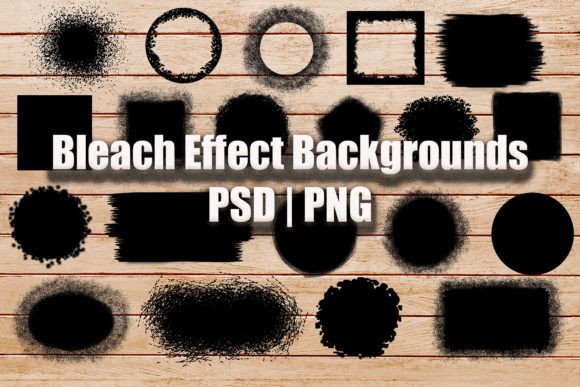
There's a particular kind of visual texture that immediately catches the eye in modern design—it's that imperfect, organic feel that suggests something handmade or artistically distressed. The Bleach Effect Backgrounds Sublimation collection taps directly into this aesthetic, offering 20 distinct designs that bring a raw, textured energy to digital and print projects. Each design in this bundle functions as a versatile backdrop, but what makes them genuinely useful is their ability to transform flat compositions into layered, tactile pieces of art.
Understanding the Visual Language of Bleach Effect Textures
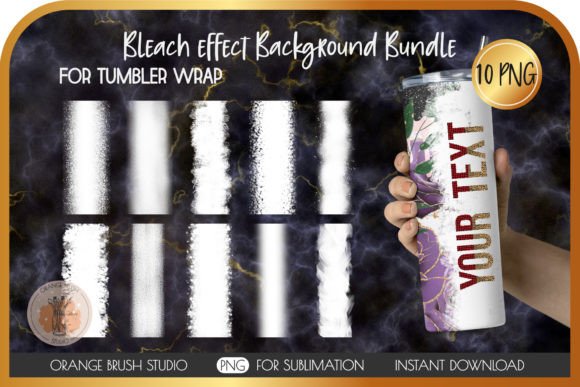
These aren't your standard digital backgrounds. The bleach effect creates an irregular, almost unpredictable pattern of light and dark areas—think of how fabric looks after it's been selectively bleached, with organic splotches, uneven edges, and subtle gradations that feel authentic. The black versions included in this set provide a dramatic foundation, where the "bleached" areas appear as lighter marks against a dark ground. This contrast naturally draws the eye and creates visual interest without overwhelming the content layered on top.
What makes these textures work so well for sublimation projects specifically is their resolution and format. At 3600 x 3600 pixels and 300 DPI, they're built for print-quality output. The transparent PNG files let you drop them onto any background color, while the PSD versions give you full editing control in Photoshop. You can adjust opacity, blend modes, and layer masks to dial in exactly the effect you need.
Where These Backgrounds Actually Shine
After working with similar design assets across dozens of projects, I've found that textured backgrounds like these perform best in specific contexts. They're particularly effective for:
- Apparel mockups and t-shirt designs—the distressed aesthetic pairs naturally with streetwear, vintage-inspired clothing, and casual brand identities
- Social media graphics—where standing out in a crowded feed matters, textured backgrounds add depth that flat colors simply can't achieve
- Packaging design—especially for artisan products, craft beverages, or any brand that wants to communicate authenticity and handcrafted quality
- Editorial layouts—magazine spreads, blog headers, and digital publications benefit from the visual weight these backgrounds provide
- Home decor products—pillow designs, tote bags, and mug designs where the sublimation process allows the texture to become part of the finished product
Practical Application: Working with the Bundle
The real value of the Bleach Effect Backgrounds Sublimation bundle lies in its flexibility. Each of the 20 designs offers a slightly different pattern and intensity, which means you're not locked into a single look. Some designs feature more aggressive bleaching with large, bold marks—these work well for projects where the background needs to make a strong statement. Others have finer, more subtle textures that function better as supporting elements.
Here's how I'd approach using them in a real project. Let's say you're creating a series of social media graphics for a small business. Start by selecting two or three background designs from the bundle that complement each other. Use one consistently across your Instagram posts to build brand recognition, then rotate in the others for variety while maintaining that cohesive textured aesthetic. The 12 x 12 inch dimensions give you plenty of canvas to work with, and you can always crop or resize for different platforms.
Layering and Composition Tips
When you're layering text or graphics on top of these backgrounds, a few practical considerations make a real difference in the final result:
- Contrast management—since these are dark backgrounds with lighter distress marks, white or light-colored text typically reads best. Test your typography at the actual size it'll appear in the finished piece.
- Feathered edge integration—the designs are specifically created with feathered edges, which means they blend more naturally into surrounding elements. Use this to your advantage when compositing multiple layers.
- Opacity adjustment—don't feel obligated to use these at full intensity. Dropping the opacity to 70-80% can create a more refined look that doesn't compete with your primary content.
- Blend mode experimentation—in Photoshop, try Overlay, Soft Light, or Multiply blend modes to see how the texture interacts with underlying colors and images.
Building Brand Identity with Textured Assets
For entrepreneurs and small business owners developing their brand identity, incorporating textured backgrounds like the Bleach Effect Backgrounds Sublimation collection can help establish a distinctive visual language. The key is consistency—using these textures as part of a defined design system rather than applying them randomly. When a customer sees your packaging, social media, and website all sharing that same distressed, authentic texture, it creates recognition and reinforces your brand personality.
This approach works particularly well for brands in the lifestyle, outdoor, fitness, or artisan spaces where authenticity and craftsmanship are core values. The bleach effect communicates something handmade and real—qualities that resonate with audiences who are increasingly skeptical of overly polished, corporate-looking design.
Commercial Considerations
If you're using these backgrounds for commercial projects—whether that's client work, products for sale, or marketing materials—the included PSD files are particularly valuable. They let you modify the designs to fit specific brand requirements, adjust colors if needed, and create variations that maintain the core aesthetic while serving different purposes. The transparent PNG format ensures compatibility across virtually any design software, from Adobe Creative Suite to Canva to Procreate.
For crafters and hobbyists working on sublimation projects, these backgrounds integrate seamlessly into standard sublimation workflows. Apply them to your mockups, add your text or graphics, and the textured foundation elevates even simple designs into something that looks professionally produced.
The Bleach Effect Backgrounds Sublimation bundle offers genuine creative utility for anyone working in visual design. Whether you're building a brand, creating products, or producing content, having 20 distinct textured backgrounds at print-ready resolution gives you a practical toolkit for adding depth, character, and visual interest to your work. The format flexibility—both PNG and PSD—ensures these assets integrate into your existing workflow without friction, making them a worthwhile addition to any designer's resource library.